
Lead capture software means two different products, and Google hasn’t picked one. The top organic result for the term is Blinq, a digital business card built for scanning badges at trade show booths, so if that’s your problem you want event lead retrieval and this isn’t your article. This one covers the form on your website, and the sixty seconds after someone hits submit, where validation, dedup, enrichment and routing decide whether the record is worth anything. That layer is missing from all ten pages ranking for this term.
What is lead capture software?
Lead capture software collects a prospect’s details and hands them to your revenue stack in a usable state. The collection surface — form, overlay, chat, badge scanner, API — is the visible part, and every vendor ships a competent one. The handoff is what you pay for: field mapping, validation, dedup, and a CRM write that doesn’t fail silently.
Five surfaces sit inside the category, and they behave nothing like each other:
| Capture surface | What it collects | Where it breaks |
|---|---|---|
| Web forms (demo, contact, gated) | Self-reported fields plus hidden context | Picklist values the CRM rejects; mapping drift |
| On-site overlays (popup, embed, slide-in) | An email, often nothing else | UTMs and hidden fields dropped in transit |
| Conversational (chat, bots, form-to-meeting) | Qualifying answers plus intent | Transcript lands where the CRM never looks |
| Events and offline (badge scan, QR) | Records in bulk, thin consent trail | Imported as a CSV days later, deduped by nobody |
| Programmatic (API, webhooks, ad lead forms) | Whatever the source sends | Silent failures: no retry, no log, no alert |
On-site overlays are a market of their own, with separate vendors, metering models and benchmarks; a hands-on ConvertBox review is a fair picture of what that category charges for. Everything below assumes the form already converts.
Why does lead capture break after the form submit?
Because the form and the CRM are two systems with different rules, and nobody owns the gap between them. The submit succeeds from the visitor’s side — they see the thank-you page — while the record fails validation, duplicates an account, waits unassigned past your SLA, or arrives stripped of the source data that made it attributable.
Five failure modes, each with a symptom you can look for this afternoon:
- The rejected field. A form passes a job title the CRM’s picklist doesn’t contain, the write fails, and the lead exists only in the form tool’s log.
- The unusable email. A typo or disposable domain enters clean, gets emailed, bounces. You paid for the click and inherited a deliverability problem.
- The duplicate. A known contact fills a new form, a second record appears, and score, owner and history split.
- The unassigned lead. The record lands, then waits while the assignment rule looks for a field enrichment hasn’t written yet.
- The lost source. UTMs live on the landing page but not in the payload, so the campaign behind the pipeline can’t be identified.
Then there’s the ceiling nobody in the top ten mentions. Salesforce Web-to-Lead accepts 500 leads per 24 hours; past that, submissions land in a pending queue shared with Web-to-Case that holds 50,000 requests, and anything beyond that is rejected permanently (Salesforce Help).
Now read the title of the support article covering it: “Web-to-Case and Web-to-Lead Daily Limits Exceeded Due to Spam“. Form spam doesn’t only pollute the CRM — it queues ahead of real leads and, past the threshold, loses them for good. Imperva’s 2025 Bad Bot Report puts automated traffic at 51% of the web, 37% of it malicious; vendor telemetry, but the best available. Validating at submit isn’t hygiene, it’s continuity.
What happens to a lead between the form and the CRM?
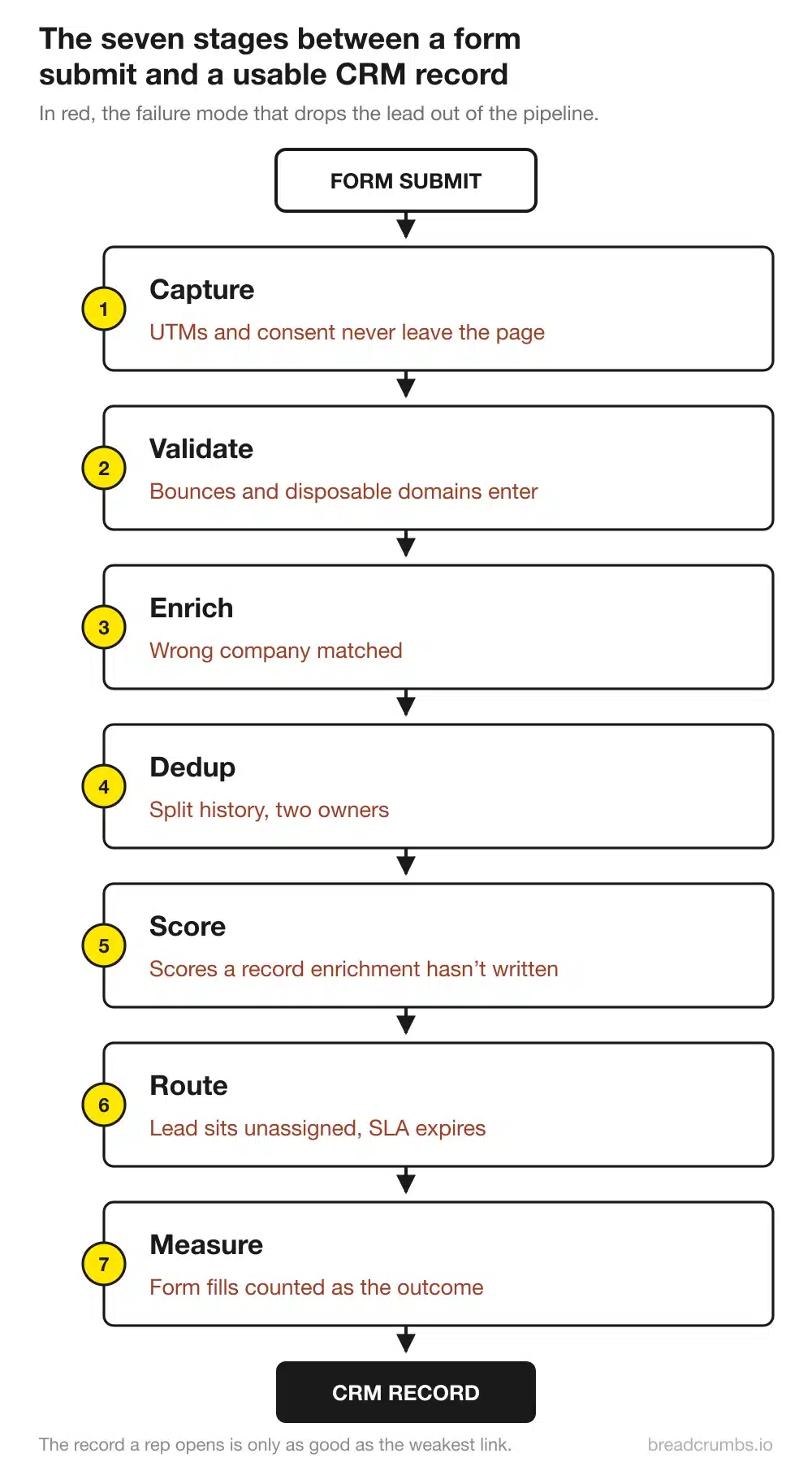
Seven things, in this order: capture, validate, enrich, dedup, score, route, measure. Most stacks perform three and assume the CRM covers the rest. Each stage has an owner, a failure mode and a measurable output, and the record a rep opens is only as good as the weakest stage it passed through.
| # | Stage | What it does | Who owns it | What breaks |
|---|---|---|---|---|
| 1 | Capture | Collects fields plus hidden context | Demand gen | UTMs and consent never leave the page |
| 2 | Validate | Confirms the email can receive mail | Marketing ops | Bounces, disposable domains, traps get in |
| 3 | Enrich | Adds firmographics you didn’t ask for | RevOps | Wrong company matched from a personal domain |
| 4 | Dedup | Decides whether this is a new record | CRM admin | Split history, reset scores, two owners |
| 5 | Score | Ranks fit and activity | Marketing ops | Scoring runs before enrichment writes |
| 6 | Route | Assigns an owner, starts the clock | Sales ops | Leads sit unassigned; the SLA expires |
| 7 | Measure | Reports capture-to-MQL by source | Analytics | Form fills counted as the outcome |
Capture: the payload matters more than the widget
The visible fields matter least. What makes a record usable later is the hidden payload: UTMs, click IDs, referrer, landing page, consent text and timestamp, plus a form ID that survives a rename. Assemble it server-side where you can — client-side JavaScript is easy to lose to a blocked script.
Every extra field costs completions. Zuko’s form benchmarking across 93 million form sessions reports 55.5% completion on desktop, 47.5% on mobile, on vendor-owned data that isn’t B2B-specific. And skip the “Baymard and HubSpot, 4.2 million submissions” study doing the rounds: Baymard researches checkout and cart UX, not lead form telemetry, and the study appears nowhere on its site. Check the source before you quote any form abandonment number, this one included.
Validate: a lead you can’t email isn’t a lead
Validation has three layers and most stacks stop at the first. Syntax catches the typo, an MX lookup confirms the domain accepts mail, and the third layer — disposable domains, role addresses, known traps — protects the channel. Run it at capture: a monthly batch finds the bad address after you’ve mailed it.
The damage isn’t confined to one campaign. Google asks bulk senders to hold spam complaints under 0.10% and never reach 0.30% (email sender guidelines, in force since February 2024); since 5 May 2025, Microsoft routes mail from senders above 5,000 messages a day to Outlook.com, Hotmail and Live addresses to the junk folder when SPF, DKIM and DMARC aren’t aligned — with outright rejection (550 5.7.515) announced to follow (Outlook’s requirements for high-volume senders). That’s why we verify the email at the point of capture.
Enrich: what you didn’t ask for on the form
Ask for three fields, let the system find the other twenty: size, industry, region, stack and funding stage all resolve from a business email domain, so the form doesn’t ask and the visitor doesn’t lie. A personal email domain matches nothing useful, so branch instead of guessing. Enrichment also has to finish before scoring and routing read the record. The enrichment services we tested differ more on match rate by region than on price.
Dedup: the match key decides everything
Pick the match key deliberately. Email is exact and brittle — one person with two addresses becomes two people. Domain matching groups a whole company and will merge divisions that buy separately. Person-level matching is the most accurate and the most expensive to maintain.
Then write down what wins in a conflict: newest value, non-empty value, or CRM value. Leaving that undefined is how enrichment overwrites a title a rep confirmed on a call. Validity’s State of CRM Data Management 2025 found 76% of 602 CRM users and admins believe less than half their data is accurate — a perception survey, not a measurement. Our notes on CRM data hygiene hold the merge rules.
Score: fit and activity, at the moment of capture
Two signals exist the second a form is submitted, and they need to stay apart. Fit comes from enrichment and is stable; activity comes from behaviour and decays. Add them into one number and a perfect-fit first-time visitor looks identical to a poor-fit serial downloader.
Sequence beats sophistication. Scoring that fires before enrichment writes grades a blank record and locks the result in, because most models never rescore on update. Scoring rules in ActiveCampaign show the mechanics before you commit to a dedicated layer.
Route: assignment rules and the SLA clock
Routing is where the pipeline stops being a data problem and becomes a revenue one. Round robin distributes volume, territory rules respect ownership, capacity rules stop a rep on holiday collecting leads for a week. The failure is rarely the algorithm — it’s the missing fallback owner for leads no rule matches. Start with the lead routing definitions if your team uses the terms loosely.
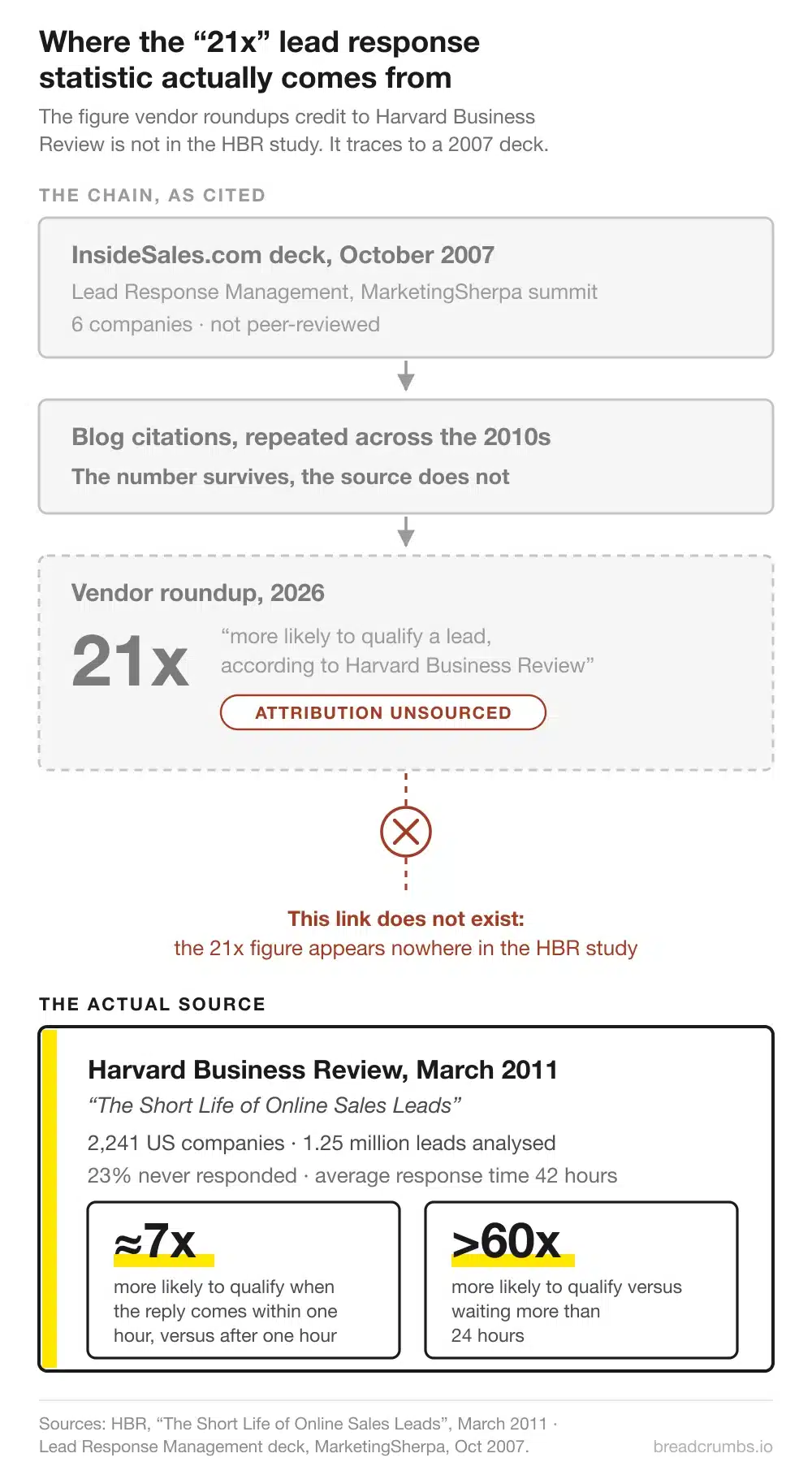
The clock is also where this category’s most-quoted number falls apart. monday.com’s 7,500-word roundup attributes exactly one figure to a source, telling readers that companies responding within five minutes are “21 times more likely to qualify those leads” and crediting Harvard Business Review. HBR never published that number. Its March 2011 study The Short Life of Online Sales Leads (paywalled) audited 2,241 US companies and separately analysed 1.25 million leads, and the multipliers it reported were roughly 7x for responding within the hour and over 60x against waiting a day.
That study also found 23% of companies never responded at all, with an average response time of 42 hours. It’s fifteen years old, so carry the date when you cite it.
The 21x and 100x figures come from somewhere else: a Lead Response Management deck (PDF) presented at MarketingSherpa’s B2B Demand Generation Summit on 16 October 2007, copyright InsideSales.com, drawn from six companies and closing with a pitch for the sponsor’s dialer. Its actual claim is narrower than the one in circulation: the odds of qualifying drop 21 times between calling at five minutes and calling at thirty, not against every slower response. And the CEO who presented that deck co-authored the HBR study four years later, which is the disclosure to carry whichever number you use.
If a vendor never traced its one statistic, assume the rest of the page got the same care. Measure your own speed to lead instead, from submit to first human contact.
Measure: capture-to-MQL by source, not form fills
Form fills are an input. The number that says whether capture works is submit-to-opportunity conversion, split by source and by capture surface, because the same form performs differently behind paid search and behind a nurture email.
Chili Piper’s February 2025 benchmark across roughly 4 million submissions found 14.1% of form fills disqualified, and demo requests that booked the meeting on the form converted at 66.7% versus 30% for a standard submit-and-wait flow. That’s their own customer base, heavily B2B SaaS and strongly selection-biased. Read it as a plausible ceiling, not an average.
What should you look for in lead capture software?
Evaluate the handoff, not the feature sheet. Every tool here builds a form, so the questions that separate them concern the record on arrival: how fields map, whether the write is native or a webhook, what happens on failure, and who owns the data when you leave. Eight criteria, in the order they usually bite:
| Criterion | The question to ask | Why it matters |
|---|---|---|
| Field mapping | Custom objects and picklists, or contact fields only? | Decides whether the record needs repair |
| Hidden fields | Are UTMs, click IDs and referrer captured automatically? | Attribution depends on it |
| Native write vs webhook | Native integration, or Zapier in a trench coat? | Each hop adds latency and failure risk |
| Dedup behaviour | What happens when the email already exists? | Merge, or a second record |
| Consent record | Are consent text and timestamp stored on the lead? | Required evidence under GDPR |
| Retry and failure log | Can you see failed writes and replay them? | Without it, lost leads are invisible |
| Rate limits | What are the documented daily ceilings? | See the Salesforce cap above |
| Export | Can you export historic submissions in full? | Sets your cost of switching |
Which lead capture tools actually fit a RevOps stack?
The tools that matter sit between the form and the CRM, and most never appear in the roundups ranking for this term. Six below, grouped by the pipeline stage they own, each with a price verified on 27 July 2026 and the commercial trap attached to it.
One honesty note about lists, this one included. All ten pages ranking for lead capture software are published by companies selling into the category, and six put their own product at number one in their own ranking, one of them written by the vendor’s founder with no disclosure on the page. Breadcrumbs sells lead scoring, so no scoring tool appears below. And price everything against the free baseline: Salesforce Web-to-Lead, subject to that 500-a-day ceiling.
HubSpot Forms — capture, on the CRM itself. Form and CRM are one database, so no sync window exists in which the lead sits in one system and not the other. The catch: progressive fields need Marketing Hub Professional — $800/month annual plus a mandatory $3,000 onboarding — and run only in the legacy form editor.
Typeform — capture, at a metering premium. High completion rates, and the default when the form is customer-facing. The catch: billing is per response, 100 included on the entry plan. Native HubSpot starts at $91/month annual and Salesforce needs Growth Flow at $266/month annual; below that you route through Zapier, which adds latency to the exact handoff you’re trying to make reliable.
ZeroBounce — validation at submit. Real-time API check that blocks typos, disposable domains, catch-alls and known traps before the record reaches the CRM. The catch: the subscription starts at $99/month with a 10,000-credit monthly minimum — at 400 submits a month you’re buying 25 times what you use. Treat the claimed 99.6% accuracy as marketing.
Clay — enrichment on capture. Queries 150+ sources in sequence until one answers, charging only for the call that found the data. The catch: actions and data credits are two meters that run out independently, and CRM auto-sync only arrives at $446/month.
Chili Piper — routing and form-to-meeting. Queries Salesforce on submit, resolves account ownership, and shows the right rep’s calendar before the page reloads. Native spam checker included. The catch: the floor is $1,250/month, $15,000 a year, for 15 seats you may not have. ChiliCal at $12/user needs a 200-seat minimum and excludes routing.
RevenueHero — routing, priced for smaller teams. The same job on a platform-fee-plus-seat model: $79/month plus $25/user annual, with domain-based matching and round robin. The catch: spam prevention and native enrichment are separate $30/month add-ons, so five reps cost $264/month, not the $125 the seat price implies.
| Tool | Stage | Entry price (27 Jul 2026) | The catch |
|---|---|---|---|
| Salesforce Web-to-Lead | Capture | Free with Professional+ | 500 leads/24h, permanent loss past the queue |
| HubSpot Forms | Capture | $9/seat/month | Progressive fields: $800/mo + $3,000 onboarding |
| Typeform | Capture | $28/month annual | Salesforce needs the $266/mo tier |
| ZeroBounce | Validate | $99/month | 10,000-credit monthly minimum |
| Clay | Enrich | $0 free tier | CRM auto-sync only at $446/mo |
| Chili Piper | Route | $1,250/month | $15,000/year floor, 15 seats included |
| RevenueHero | Route | $79/mo + $25/user | Spam blocking and enrichment +$30/mo each |
Every price links to the vendor’s own pricing page, checked on 27 July 2026. They will drift: check them again before you budget.
What are the most common lead capture mistakes?
The recurring failures are process failures, not tooling failures, and four of the five cost nothing to fix. Each one below has a symptom you can check today and a fix that fits inside a sprint, using configuration you already own.
- Asking eleven fields to qualify a lead. Fix: ask three, enrich the rest, collect more on the second visit.
- Validating email in a monthly batch. Fix: validate at submit. A bounce found 30 days later has already hit your sender reputation.
- Leaving dedup to the CRM’s default matching. Fix: define the match key and conflict rule, then test with a known duplicate.
- Routing by spreadsheet and rota. Fix: encode territory, capacity and fallback owner as rules, and alert on anything past your SLA.
- Never opening the failed-submission log. Fix: find it — every tool has one — and check it weekly.
How do you choose lead capture software in five minutes?
Choose by denominator, not by feature matrix. Four questions settle it: where the leads come from, which CRM they must land in, how many submissions you take a month, and whether your market is US or EU. The last one eliminates entire product categories before you book a demo.
- Salesforce, high inbound volume → check the daily cap, then budget for routing. Chili Piper if the SLA is the bottleneck, RevenueHero under ten reps.
- HubSpot shop → use the native forms, spend the money on validation and enrichment instead. A shorter form beats $800/month of progressive fields.
- Under 1,000 submissions a month → skip subscription validation, buy pay-as-you-go credits, put the difference into enrichment.
- EU or UK market → rule out person-level visitor identification. RB2B states its person-level resolution fires only for US IP addresses.
- Events plus web → two capture systems, one dedup layer. A badge scan and a demo request must not create two records.
Key takeaways
- The widget is commodity; the handoff is the product. Evaluate mapping, dedup behaviour, failure logs and export before the form editor.
- Validation at submit protects company-wide deliverability, not one campaign: Google’s 0.30% spam ceiling applies to your domain.
- Sequence the pipeline — enrich before scoring, score before routing — and give every rule a fallback owner.
- Every price here has a trap one tier above the advertised one. Ask what the plan you’d actually run costs, then compare it to free Web-to-Lead.
Lead capture software FAQ
What is lead capture software?
Software that collects prospect details from a form, overlay, chat, event scanner or API and delivers them into your CRM in a usable state. The collection surface is the visible part; the value sits in mapping, validation, dedup and routing, the steps that decide whether the record is workable.
What are lead capture tools?
The category mixes three products: form builders that collect the data, validation and enrichment services that improve it, and routing tools that assign it. Most roundups list all three interchangeably, and several add outbound databases like ZoomInfo, which capture nothing.
What’s the difference between lead capture software and lead generation software?
Lead generation creates demand: ads, content, outbound. Lead capture converts it into records and moves them into the CRM. They fail differently: generation fails loudly, by producing no interest; capture fails silently, with interest that never becomes a usable record.
Is there free lead capture software?
Yes, and some is production-grade. Salesforce Web-to-Lead is included from Professional up, and HubSpot’s free forms write straight to its CRM. Paid tiers usually gate the CRM integration rather than the form.
Do you need a CRM to manage captured leads?
At any volume, yes — but the sharper question is what state they arrive in. A spreadsheet of clean, deduped, routed records beats a CRM full of duplicates. Fix the pipeline first, then argue about the destination.
What is a lead capture page?
A standalone page with one conversion action and the navigation stripped out to protect it. The post-submit rules still apply: it must pass UTMs, click IDs, referrer and consent timestamp into the payload, or it will convert well and attribute nothing.
The pipeline ends with a grade, so see how a B2B lead scoring model keeps fit and activity apart →