
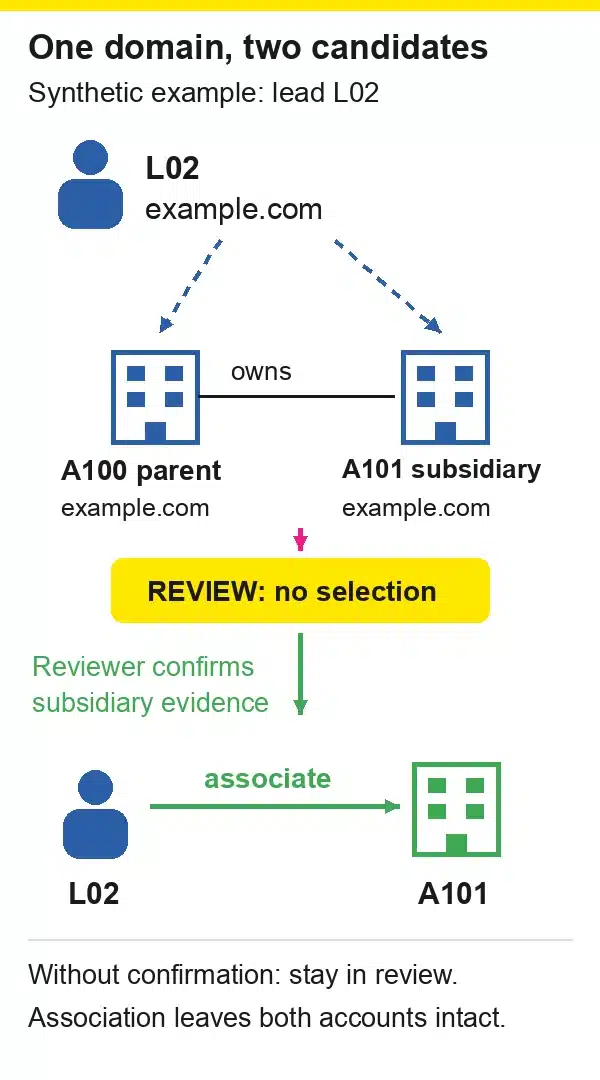
A lead uses the same email domain as two accounts. One is the parent company; the other is its subsidiary. Choosing whichever account has more contacts makes the field look complete. It doesn’t make the association correct.
Lead-to-account matching needs a defensible answer to a narrow question: which existing account does this person represent? Salesforce lead-to-account matching and other native features can help identify candidates, but your team still needs rules for ambiguous evidence. Start with the decision matrix below, then test the exceptions before allowing associations to drive commercial actions.
What does lead-to-account matching decide?
Lead-to-account matching identifies the account associated with a lead using evidence such as a verified relationship, company domain, or corroborated company details. Its output should be a supported account association, a review request, or an unresolved result. It does not, by itself, decide ownership, priority, or whether records should merge.
Keep those decisions separate in your workflow. Matching asks which company the person represents. Deduplication asks whether multiple records describe the same entity. Routing chooses an owner. Scoring assesses commercial priority. A correct answer to one question doesn’t settle the others.
For example, two employees of the same customer can correctly match one account without being duplicate contacts. A subsidiary can belong to a parent hierarchy without being interchangeable with the parent. A low-priority lead can still have an unambiguous account association.
Your lead capture workflow should preserve enough source context for matching to make that distinction. Later, B2B lead scoring can use the verified association without disguising uncertainty as a firmographic fact.
Define the account grain first: legal entity, operating company, or another explicitly documented unit. Otherwise, two reviewers can examine identical evidence and choose different accounts while both follow their own reasonable interpretation. Record parent relationships separately when you need both the operating entity and the wider corporate group.
Which evidence should lead-to-account matching rules use?
Use evidence that explains both the proposed account and why competing candidates were rejected. Start with a verified existing relationship, then assess domain and company details against source freshness and account structure. Normalize inputs for comparison, but retain their originals. A recent field update is not automatically a recent verification.
An account ID is useful only when you know where it came from. An authenticated customer workflow and an unrestricted form field don’t deserve equal authority. If a submitted ID conflicts with a confirmed customer relationship, create an exception instead of silently replacing the association.
Domain normalization should remove irrelevant differences, such as capitalization or a website URL’s path. It must not erase meaningful distinctions without a policy: a subsidiary subdomain may carry useful information. Keep domain aliases under an accountable owner, especially after acquisitions and rebrands.
Firmographic data can corroborate identity through location and company details. Employee count or industry alone is weak evidence: many companies share those attributes. Likewise, several providers repeating one underlying source are not necessarily independent confirmation.
Use this minimum decision record:
| Field | What to retain |
|---|---|
| Lead and candidates | Lead ID; every candidate account ID considered |
| Decision | Selected account ID or null; auto, review, or unmatched |
| Evidence | Source reference, observed-at time, original and normalized value |
| Explanation | Rule version and a specific reason code |
| Accountability | Reviewer, override reason, and correction reference |
Store references to necessary evidence rather than copying entire personal profiles into a log. Restrict access according to your existing data-handling policy.
Separate observed_at from verified_at when the distinction matters. An integration can write an old company name today. If your process treats that write as fresh employment evidence, it can undo a correct association repeatedly. Maintaining those fields is part of CRM data hygiene, not a problem a more permissive matcher can solve.
How should you handle lead-to-account matching exceptions?
Handle exceptions with explicit evidence requirements and a visible unresolved state. Shared domains need entity-level confirmation; personal email needs another source of company context. Typos should generate candidates, not authorize merges. Preserve existing verified relationships when new evidence is weak, and send genuine conflicts to a reviewer who can inspect the alternatives.
The following matrix is a proposed operating policy, not a vendor algorithm or a tested implementation. Calibrate any automatic action against your own labeled records.
| Situation | Evidence to inspect | Proposed decision |
|---|---|---|
| Existing account association | Provenance and current relationship | Retain if consistent; review conflicts |
| Unique business domain | Domain aliases and corroborating company details | Auto candidate under a validated rule |
| Shared parent/subsidiary domain | Entity, geography, and confirmed hierarchy | Review the entity choice |
| Personal email | Submitted website and confirmed company context | Review; leave unresolved if insufficient |
| Company typo or alias | Normalized name plus independent evidence | Candidate, not automatic merge |
| Changed employer or acquisition | Effective date and old/new entity evidence | Review; preserve historical context |
| No account candidate | Completeness, account visibility, and sync scope | Unmatched queue before account creation |
| Suspected duplicate accounts | Same-entity evidence and survivor policy | Separate deduplication review |
Six fixtures to test before enabling automatic association
These are synthetic examples, not Breadcrumbs customer records or measured outcomes. Assume A100 is a parent and A101 its subsidiary; both use example.com. A200 is an unrelated company with the separately verified domain example.org.
- L01: clear business-domain evidence. The lead uses
example.org, names A200’s company, and has no conflicting association. Expected outcome: A200 under your approved unique-domain rule, with reasonunique_domain_corroborated. The test fails if the system selects A100 merely because it is larger. - L02: shared-domain ambiguity. The lead uses
example.com, but the form names only the group brand. Expected outcome: review with candidates A100 and A101 and reasonshared_domain_entity_unknown. Selecting either account without another distinguishing fact is not a successful match. - L03: personal email with context. The lead uses a personal mailbox and supplies
example.orgas the company website. A reviewer confirms the current company relationship. Expected outcome after that review: A200, with the confirmation reference. The website alone should not be disguised as a completed verification. - L04: no company evidence. The lead provides a personal mailbox without usable company details. Expected outcome: unmatched, reason
insufficient_company_evidence. Don’t manufacture a company account from the mailbox provider’s domain. - L05: changed employer. The existing association is A100, while newly confirmed employment evidence points to A200. Expected outcome: review the change and its effective date. A current association correction must not silently move historical activity to the new employer.
- L06: similar name, conflicting geography. The company name resembles A200 after normalization, but another company with that name operates in the submitted country. Expected outcome: review, reason
name_geography_conflict. A fuzzy score is candidate evidence, not permission to ignore the conflict.
For each fixture, assert the decision state, candidate set, selected account, and reason. Checking only that an account field is populated lets the most expensive errors pass your test.
Add a replay check, too. After a reviewer resolves L02, resubmit the same unchanged evidence through the same ingestion path. The expected result should respect the documented override rather than return the lead to an arbitrary account. Define which new evidence is strong enough to reopen that decision.
What can Salesforce lead-to-account matching do natively?
Salesforce documents a standard Leads on Accounts matching rule activated with Account Engagement Advanced or Premium. It populates the Matched Leads component and uses several matching criteria, not just exact company names. That capability is narrower than a promise that every Salesforce organization automatically associates and routes all incoming leads.
The Salesforce rule documentation describes company-name normalization and comparisons involving company details or website information. The website path compares a lead’s email domain with the account website and ignores common personal-email domains. A personal-email exclusion in that rule is a product behavior, not a reason to reject the lead commercially.
Don’t confuse candidate identification with the action taken afterward. Salesforce’s duplicate-management lesson distinguishes matching rules from duplicate rules: the former identify possible duplicates, while the latter determine responses such as alerts or blocking. Neither distinction gives an ambiguous association permission to become a merge.
Ask your administrator to answer these questions for your organization:
- Which matching capability is available and enabled?
- Does it expose candidate leads, persist an association, or trigger a separate action?
- Where do shared domains, conflicting existing associations, and unmatched leads go?
Then run the synthetic fixture set against your configured process. Add organization-specific cases for account visibility and the integration user: a matcher cannot consider an account excluded from its inputs. Record the expected result before running the test, so an unexpected behavior doesn’t become the new definition of correctness.
This is a decision checklist, not a tested Salesforce setup tutorial. Documentation can establish what a feature supports; it cannot establish that your mappings, permissions, and downstream automations behave correctly. Keep the test report separate from the configuration inventory, and have a second person examine incorrect associations rather than relying only on the rule author’s judgment.
How do HubSpot, Marketo and RTCDP matching differ?
These products operate on different objects and workflows, so compare their documented outputs before comparing labels. HubSpot describes contact-company association; Marketo Target Account Management matches leads to named accounts; Real-Time CDP B2B produces account-person relationships through batch matching. Their handling of ambiguity and processing cadence should shape your tests, not substitute for them.
| Documented workflow | Mechanism or output | Exception to test |
|---|---|---|
| HubSpot association | Email-domain-based contact/company association | Multiple companies share one domain |
| Marketo Target Account Management | Fuzzy matching to named accounts; strong and weak matches | Weak match requiring manual resolution |
| Real-Time CDP B2B | Deterministic/probabilistic matching; account-person relationship dataset | Required source key or company evidence missing |
HubSpot says that when several companies share a domain, automatic association chooses one company and you cannot select which one through that setting. It can also consider a contact’s Website URL when the email uses a personal domain. Those two cases deserve separate tests; neither supports treating domain association as proof of legal identity.
HubSpot also warns against enabling automatic association alongside its Salesforce integration because duplicate companies can result. Check the documented integration caveat before enabling another system to create accounts. A second writer of associations is another place for conflicts to arise.
Adobe describes Marketo’s named-account matching as near-real-time, with weak matches available for manual resolution. Its RTCDP B2B documentation instead describes matching against a new person-profile snapshot on a 24-hour cycle. RTCDP also requires the person source key and qualifying company or email evidence.
Don’t borrow the timing description from one Adobe product to describe another. Ask where your process reads the result, how it detects an incomplete job, and what happens while an association remains unresolved. These are documentation-based distinctions, not performance measurements or service-level guarantees.
How do you measure and correct matching errors?
Measure coverage and correctness separately, using a defined cohort and explicit denominators. Audit associations against independent evidence, including difficult cases, rather than treating every populated account field as correct. Track unresolved work and corrections alongside automation. A rule that fills more fields can still leave your team with more wrong accounts.
Report each measure with its denominator:
| Measure | Calculation | What it does not prove |
|---|---|---|
| Automation coverage | Automatically associated eligible leads / all eligible leads | Correctness of those associations |
| Audited precision | Confirmed correct associations / audited associations | Accuracy across unaudited records |
| Wrong-association proportion | Wrong associations / audited associations | Statistical false-positive rate without true negatives |
| Recall on labeled data | Correctly associated leads / labeled leads with a genuine eligible existing account | Anything reliable without that labeled denominator |
Define the period, ingestion sources, exclusions, and account-eligibility rules before counting. Keep review decisions out of automatic coverage, and report whether the precision sample contains automatic associations, human decisions, or both.
For a synthetic arithmetic example, suppose a cohort contains 200 eligible leads and 140 receive automatic associations. Coverage is 140/200, or 70%. If an independent audit checks all 140 and confirms 137 correct associations, audited precision is 137/140, or 97.86%; three associations are wrong. These are illustrative numbers, not a benchmark or an acceptable-error recommendation.
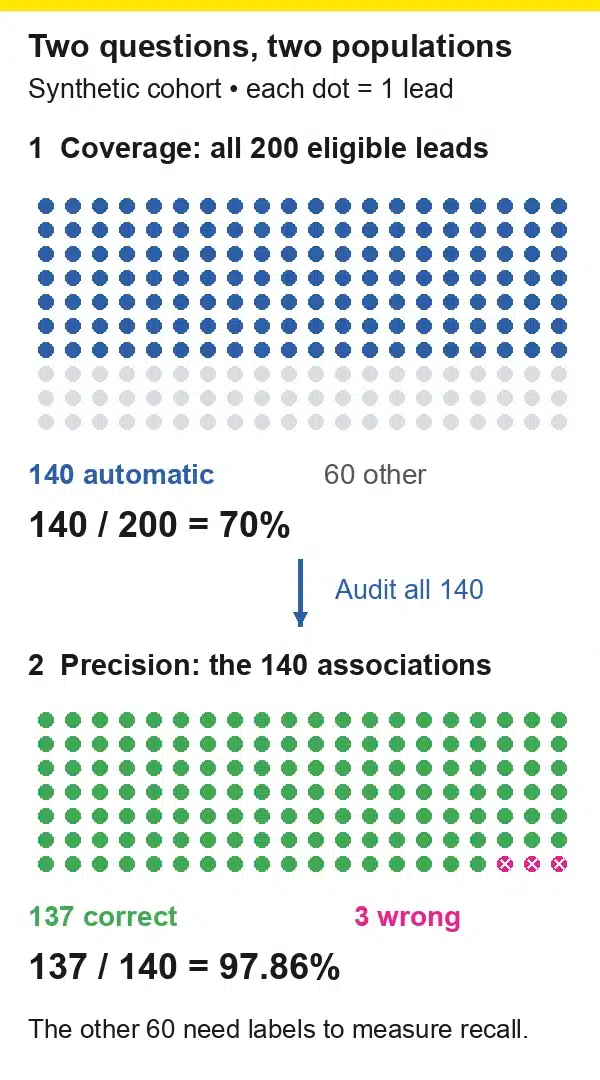
The remaining 60 leads do not establish recall. Some may genuinely have no eligible account; others may be missed matches. You need labels for that distinction. Likewise, a sample concentrated on clean business domains tells you little about the shared-domain rule, so break results out by rule and source.
For correction, retain the previous account ID, reason, evidence reference, and affected rule version. Change only the intended relationship after review, then inspect the systems that consumed it. A corrected CRM field does not unsend an email, restore an earlier score, or repair every external report automatically.
If several failures share one rule, pause or narrow that rule while investigating. Recheck affected records and verify overrides survive the next sync. Keep suspected duplicate-account repairs in a separate CRM data quality process with its own merge controls.
Finally, report unresolved queue age as well as queue size. A stable count can hide cases that nobody owns. Name an exception owner and a review cadence appropriate to your workflow, without converting a suggested cadence into a universal response-time target.
Which lead-to-account matching questions should your team settle?
Settle the rules for missing evidence, conflicting evidence, existing associations, and account creation before you automate. Each decision should name the evidence required and the person authorized to resolve an exception. Leave uncertainty visible until it is resolved; account matching should not manufacture certainty just to make a dashboard look cleaner.
Should every personal-email lead stay unmatched?
No. A personal mailbox removes one useful company signal, not every possible signal. Use submitted company information and corroboration, then retain the evidence behind a reviewed association. Without that evidence, keep the result unresolved rather than guessing.
Should a shared domain default to the parent account?
Only if your explicit account-grain policy makes the parent the intended entity and the evidence supports that choice. If the workflow needs the subsidiary, preserve the parent hierarchy separately. Account size, number of contacts, or an owner’s preference doesn’t settle which entity the lead represents.
Does unmatched mean you should create a new account?
No. First check whether the account already exists under an alias, is outside the sync scope, or is hidden from the integration. Account creation needs its own duplicate check and minimum evidence. An empty candidate list is an observation about the search, not proof of a new company.
Who can override an existing association?
Assign that authority to an accountable data owner and require a reason plus supporting evidence. Define what a later sync may overwrite and which changes need renewed review. Start your next matching audit with the six fixtures above, then add the exceptions your sales and customer success teams actually encounter.